The customization promise — and the hidden cost
Dubsado is one of the most flexible CRMs on the market. You can build custom forms, conditional email workflows, client portals, and proposal sequences — tailored to almost any service business.
For home stagers, that flexibility comes at a price: time. Users commonly spend 20 to 40 hours configuring Dubsado before it's actually useful. Every workflow, every contract template, every email sequence has to be built from scratch — because Dubsado doesn't know what a 'destage' is, or that your crew arrives before the photographers.
ThriveOS ships with staging workflows already configured. Project phases, contract templates, team scheduling, and financial tracking — they reflect how staging actually works, not a blank-canvas generic framework you need to fill in yourself.
"I spent three weekends 'setting up' Dubsado. With ThriveOS I had my first real project running in under an hour."— Home stager, Pacific Northwest

ThriveOS
ThriveOS was designed specifically for property service businesses. Project phases, contract templates, team scheduling, per-property financial tracking — everything maps directly to how staging actually works. You open it and start working.
Labor and materials costs are tracked per project by default. You see your real margin on every job without building a single spreadsheet or custom field.
- ✓Staging-specific project structure out of the box
- ✓Real-time labor and materials cost per property
- ✓Team scheduling and crew calendar included
- ✓Client portal and e-sign without configuration
Dubsado
Dubsado's strength is its flexibility — it can be shaped to fit almost any service business workflow. For stagers who have genuinely unique processes or want total control over their client experience, that power is real.
The trade-off is setup time and ongoing maintenance. The platform doesn't come pre-configured for staging, which means you're building the workflows yourself — or hiring someone who has.
- –Highly customizable for unique workflows
- –Strong community with tutorials and templates
- –Broad integration ecosystem
- –Established platform with proven reliability
The honest take
Dubsado is infinitely flexible. ThriveOS is ready on day one.
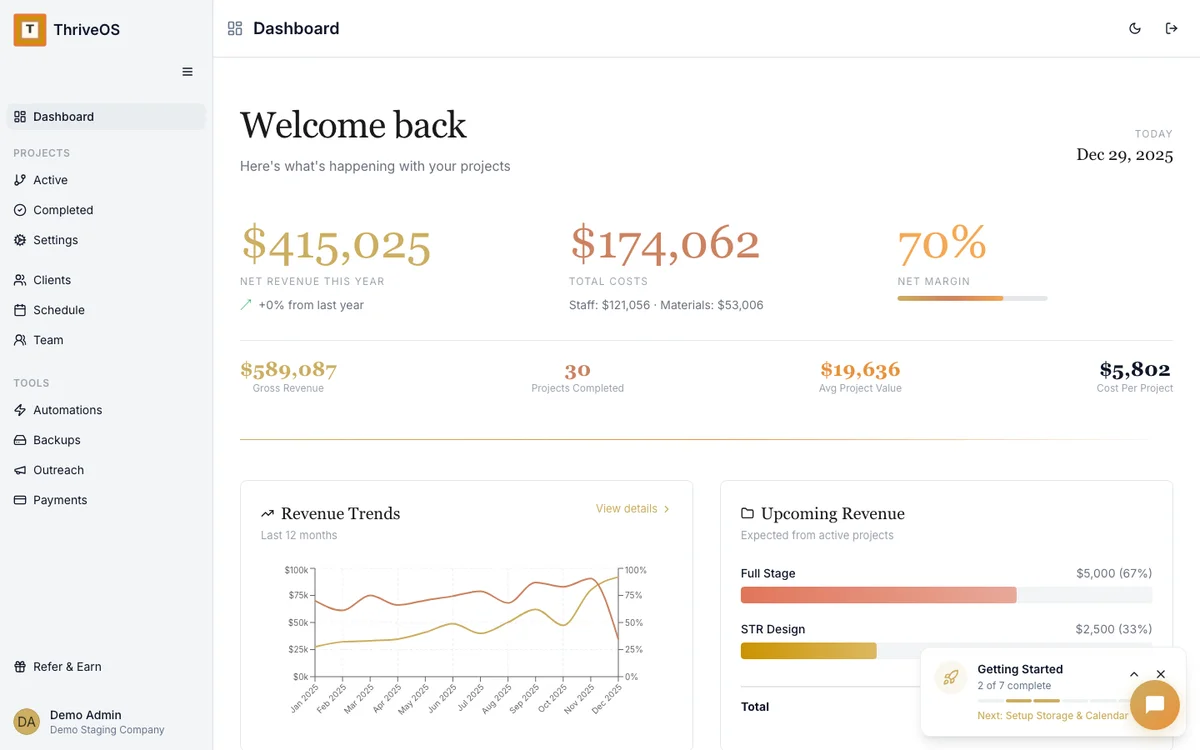
ThriveOS shows your full financial picture — revenue, costs, and margins — without any custom field configuration.
Where the gap matters most for staging businesses
Team scheduling is the clearest example. Dubsado handles client communication and project management well, but doesn't include crew scheduling for multi-person installs. Most staging businesses end up using a separate tool — adding cost, complexity, and another system to maintain.
ThriveOS includes staff scheduling as a core feature. Assign crew members, set install and destage windows, send automated confirmations to clients — all within the same platform you use for contracts and invoices.
The same pattern holds for financial tracking. Dubsado tracks revenue per client file. ThriveOS tracks labor and material costs per property, giving you the real margin picture for every job.
Stop Configuring. Start Staging.
ThriveOS is free to start. No configuration weekends, no workflow templates to build. Just open it and run your first project.
Start Free Today